Operationalizing Context Graphs: CISO Cybersecurity Ops Agent Demo
Target Audience: Chief Information Security Officers (CISOs), Security Operations Leaders, VCs evaluating cybersecurity AI investments, Consulting Partners
Purpose: A working demo proving that AI-augmented security operations can compound intelligence over time — not just detect threats, but get measurably smarter through governed context and runtime learning.
Core Thesis: "Your SIEM gets better detection rules. Our SOC copilot gets smarter."
Version History
Version | Date | Changes |
v5 | Feb 2026 | Standardized terminology (decisions vs runs), fixed NBP alignment, added TOC, clarified Tier 2 graphics strategy |
v4 | Feb 2026 | Added comprehensive graphics markers, NBP prompts created, fixed theme inconsistencies |
v3 | Feb 2026 | Added Situation Analyzer + AgentEvolver concepts, two-loop architecture |
v2 | Feb 2026 | Initial demo specification with 4-tab structure |
Table of Contents
Quick Reference Card
Concept | What It Means | Demo Location |
CONSUME | Read the context graph to validate decisions | Tab 2 (Eval Gates), Tab 3 (Graph Viz) |
MUTATE | Write learnings back to the graph | Tab 2 (TRIGGERED_EVOLUTION) |
ACTIVATE | Execute governed actions with evidence | Tab 3 (Closed Loop) |
Loop 1: Situation Analyzer | Smarter WITHIN each decision | Tab 3 |
Loop 2: AgentEvolver | Smarter ACROSS decisions | Tab 2 |
Two Loops, One Graph | Both loops compound on same substrate | Tab 4 |
Key Metrics (Week 1 → Week 4):
Auto-close rate: 68% → 89% (+21 pts)
MTTR: 12.4 min → 3.1 min (-75%)
Patterns learned: 23 → 127
Situation types: 2 → 6
Evolved prompts: 0 → 4
Executive Summary
The Problem
Security Operations Centers are drowning:
Pain Point | Impact |
10,000+ alerts/day | Analysts can't keep up |
80% false positive rate | Most work is wasted |
70% time on triage | No time for actual security |
$150K+ analyst turnover | Burnout is the norm |
12+ minute MTTR | Attackers move faster |
Same alert, 50+ times | No institutional learning |
[GRAPHIC-01] Four Structural Gaps

Type: EXISTING — Direct ReuseSource: Gen-AI ROI in a Box Blog, Slide 2Wix URL: https://static.wixstatic.com/media/1ea5cd_8ffd88d7e38c47ac9efdd471d49662cf~mv2.jpegContent: "Four Structural Gaps Between AI Pilots and Production ROI" — shows No Enterprise Context, No Operational Evolution, No Situation Analysis, No Maintainable ArchitectureUse: Executive Summary — frames the problem
Show Image
The Solution
A SOC Copilot that doesn't just process alerts — it learns from every decision and compounds that learning into better future decisions.
Week 1 | Week 4 | Improvement |
68% auto-close rate | 89% auto-close rate | +21 points |
12.4 min MTTR | 3.1 min MTTR | -75% |
4,200 FP investigations/week | 980 FP investigations/week | -77% |
Same model. Same rules. More intelligence.
The Two Stories This Demo Tells
Story | Audience | What It Proves | Primary Tab |
"SOC Efficiency" | CISOs / Security Leaders | Immediate alert triage improvement | Tabs 1, 3 |
"Compounding Moat" | VCs / Investors | Runtime evolution + defensibility | Tabs 2, 4 |
Part 1: Value Proposition
For CISOs (The Immediate Value)
Problem: Your Tier 1 analysts investigate the same patterns repeatedly. Every time John Smith travels, you get an anomalous login alert. Every time. And every time, a human closes it.
Solution: Wire those decisions into a compounding loop:
Traditional SOC: Alert → Analyst investigates → Closes as FP → Same alert tomorrow → Repeat
Our SOC Copilot: Alert → Copilot decides (with context) → Closes as FP → LEARNS → Same alert pattern auto-closes next time (with audit trail)
Quantifiable ROI:
Metric | Before | After | Value |
Tier 1 analyst FTEs needed | 12 | 5 | $1.05M/year saved |
Alerts requiring human review | 10,000/day | 2,100/day | 79% reduction |
Mean Time to Respond (MTTR) | 12.4 min | 3.1 min | 75% faster |
Analyst turnover rate | 40%/year | 15%/year | Retention improvement |
For VCs (The Investment Thesis)
The Moat:
Every customer deployment creates a compounding advantage:
Decision patterns accumulate in the context graph
Attack signatures become institutional knowledge
False positive patterns become auto-close rules
Competitors start at zero. We start at 127 patterns.
[GRAPHIC-02] Compounding Moat

Type: EXISTING — Direct ReuseSource: Gen-AI ROI in a Box Blog, Slide 4Wix URL: https://static.wixstatic.com/media/1ea5cd_b63ace0970914de2a01d816a099ad5f0~mv2.jpegContent: "Why We Win: The Compounding Moat" — shows dual-input compounding mechanismUse: Part 1 — The Investment Thesis
Show Image
The "Why We Win" Architecture: Dual-Input, Dual-Loop
[GRAPHIC-03] SOC Dual-Input Architecture

Type: NEW — NBP FROM SCRATCHReference: UCL Blog, Infographic 10 (for inspiration only)NBP Archetype: Stack (3-layer)NBP Theme: LightNBP Size: 2048x1152Title: "SOC Copilot: Dual-Input Architecture"Subtitle: "Structure flows in. Intelligence flows back. Both feed the same graph."Content:
Top layer: "STRUCTURE IN" — Users, Assets, Patterns, Policies, Threat Intel
Middle layer (emphasized): "ACCUMULATED CONTEXT GRAPH (Neo4j)" with S1-S4 Serve Ports
S1: "SOC Metrics" (alert volume, FP rate, MTTR)
S2: "ML Features" (user risk scores, asset criticality)
S3: "Alert Context Packs" (user profile, travel, devices, patterns)
S4: "Agent Situational Frame" (classified situation + options evaluated)
Activation: "Closed Loop" (auto-close, escalate, remediate)
Bottom layer: "INTELLIGENCE BACK" — Decisions, Outcomes, Confidence Updates, Pattern Learnings
Side labels: "Loop 1: Smarter WITHIN each decision" (left), "Loop 2: Smarter ACROSS decisions" (right)
Footer: "Works with: Splunk • Microsoft Sentinel • CrowdStrike • Palo Alto"
NBP Files: soc_dual_input_prompt.md + soc_dual_input.json
The Soundbite:
"Splunk shows you what happened. We show you a SOC that learns."
Part 2: Technology Architecture
Technology Framework: Context Graphs Operationalized
The Conceptual Foundation: Context Graphs
Context Graphs are structured representations of enterprise knowledge that capture not just data, but decision traces — why decisions were made, what patterns were matched, what precedents exist. This is what Foundation Capital calls "AI's trillion-dollar opportunity."
But here's what most miss: A context graph as a data structure is necessary but not sufficient. Dumping metadata into Neo4j doesn't make agents work. You need systems that operationalize the graph:
System | Function | Demo Component |
CONSUME | Systems that READ the graph to reason and validate | Evaluation Gates, Graph Traversal |
MUTATE | Systems that WRITE BACK learnings to the graph | TRIGGERED_EVOLUTION |
ACTIVATE | Systems that ACT safely with evidence capture | Closed Loop Execution |
[GRAPHIC-04] Agentic Systems Need UCL — One Substrate for Many Copilots

Type: EXISTING — Direct ReuseSource: Enterprise-Class Agent Engineering Stack Blog, Figure 5Wix URL: https://static.wixstatic.com/media/1ea5cd_75eecc9e0f36438d8b3b38de41064931~mv2.jpgContent: Shows multiple copilots consuming one governed UCL substrateUse: Part 2 — Technology Framework to explain why single substrate matters
Show Image
Why This Matters for Partners:
When competitors say "we have a knowledge graph too," ask: Do you have systems that consume it for reasoning? That mutate it with learnings? That activate governed actions? Without all three, it's just a database.
[GRAPHIC-05] Governed ContextOps Engine

Type: EXISTING — Direct ReuseSource: UCL Blog, Infographic 7 — "Operational Core — Governed ContextOps Engine"Wix URL: https://static.wixstatic.com/media/1ea5cd_b27c218b1fda4dfd8e688edf3eb4acc6~mv2.jpegContent: Shows Design → Compile → Evaluate → Serve pipeline with CONSUME/MUTATE/ACTIVATEUse: Part 2 — Shows the ContextOps pattern that SOC Copilot implements
Show Image
High-Level Architecture
[GRAPHIC-06] CISO Copilot System

Type: EXISTING — Direct Reuse ⭐ EXACT MATCHSource: Gen-AI ROI in a Box Blog — CISO Copilot System sectionWix URL: https://static.wixstatic.com/media/1ea5cd_e69a3f208a2c455b849f442c52cbcd2d~mv2.jpegContent: Complete CISO Copilot system diagram showing:
KPIs: MTTR ↓40-70%, exposure window ↓30-60%, false positives ↓20-50%
Flows: KEV-to-Remediation Intercept, Identity & Privilege Drift Guard
Stack: UCL (Sentinel/Splunk/CrowdStrike context) → Agent Engineering → ACCP → CISO Copilot
Use: Part 2 — Primary architecture diagram for CISO demo
Show Image
Architecture Summary:
Layer | Components | Purpose |
Presentation | 4-Tab Demo UI | SOC Analytics, Runtime Evolution, Alert Triage, Compounding |
Agent | agent.py + reasoning.py (~200 lines) | Decision engine + LLM narration |
Data | BigQuery + Firestore + Neo4j | Analytics + Operational + Context Graph |
AI | Gemini 1.5 Pro (Vertex AI) | Narration only (decisions are rule-based) |
[GRAPHIC-07] The Agent Engineering Stack

Type: EXISTING — Direct ReuseSource: Enterprise-Class Agent Engineering Stack Blog, Figure 1Wix URL: https://static.wixstatic.com/media/1ea5cd_f5433625d5ca410f933bacd12173e7bc~mv2.jpegContent: Six-pillar agent engineering architectureUse: Part 2 — Shows the full technical stack underlying the demo
Show Image
Technology Stack
Category | Technology | Purpose |
Analytics Data | BigQuery | SOC metrics, SLAs, detection rule performance |
Operational Data | Firestore | Alerts, decisions, deployments, real-time state |
Context Graph | Neo4j Aura | The compounding substrate |
AI/Narration | Gemini 1.5 Pro | Via Vertex AI — narration only |
Frontend | React 18 + TypeScript + Tailwind + shadcn/ui | Demo UI |
Backend | FastAPI (Python 3.11+) + Pydantic v2 | API layer |
Graph Viz | NVL (Neo4j Visualization Library) | Graph rendering |
Agent Architecture
Core Insight: The demo proves the ARCHITECTURE, not agent sophistication.
The agent is intentionally simple (~200 lines total):
agent.py — Decision engine + trace writer
reasoning.py — LLM prompt templates for narration
Why Simple Works:
Benefit | Explanation |
Auditable | CISOs need to explain decisions to auditors |
Predictable | Same input → same decision (critical for security) |
Demo-reliable | No LLM flakiness during presentation |
Fast | Sub-second decisions |
Transparent | Rules can be inspected and validated |
How the Three Systems Map to Demo Tabs
System | What It Does | Demo Tab | Key Visual |
CONSUME | Reads context graph, validates decisions | Tab 2 (Eval Gates), Tab 3 (Graph Viz) | "47 nodes consulted" |
MUTATE | Writes learnings back to graph | Tab 2 (TRIGGERED_EVOLUTION) | "Confidence: 91% → 94%" |
ACTIVATE | Executes governed actions with evidence | Tab 3 (Closed Loop) | "EXECUTED → VERIFIED → EVIDENCE" |
Part 3: Domain Model
Alert Types
ID | Name | Description | MITRE ATT&CK | Typical Volume |
anomalous_login | Anomalous Login | Unusual auth pattern (time, location, device) | T1078 | 3,000/day |
phishing | Phishing Attempt | Email-based threat detected | T1566 | 1,500/day |
malware_detection | Malware Detection | Endpoint protection alert | T1204 | 800/day |
data_exfiltration | Data Exfiltration | DLP alert, unusual data movement | T1041 | 200/day |
Decision Actions
Action | Description | Auto-Executable | Requires Human |
false_positive_close | Auto-close with audit trail | ✓ | |
enrich_and_wait | Gather more context, re-evaluate | ✓ | |
auto_remediate | Automated containment (isolate, quarantine) | ✓ | |
escalate_tier2 | Senior analyst review | ✓ | |
escalate_incident | Create incident, engage IR team | ✓ | |
escalate_critical | Wake up on-call, executive notification | ✓ |
Neo4j Schema
Node Types

Sample Seed Data
Attack Patterns (Learned from Historical Decisions)
ID | Name | FP Rate | Occurrences | Confidence |
PAT-TRAVEL-001 | Travel login false positive | 94% | 127 | 0.92 |
PAT-PHISH-KNOWN | Known phishing campaign | 2% | 89 | 0.96 |
PAT-MALWARE-ISOLATE | Malware auto-isolate | 8% | 34 | 0.91 |
PAT-VPN-KNOWN | Known VPN provider | 96% | 245 | 0.94 |
PAT-LOGIN-NORMAL | Normal location login | 98% | 2,847 | 0.97 |
Part 4: Agent Implementation
Decision Logic (Simplified)

LLM Narration

python
Tab 1: SOC Analytics (20% Energy)
Purpose: Prove immediate value — governed metrics, detection rule performance, sprawl detection.
Systems Demonstrated: Basic CONSUME (query resolution)
Demo Flow:
Analyst asks: "What was our false positive rate last week by detection rule?"
System routes to correct metric contract
Returns chart with provenance panel (sources, query logic, freshness)
Detects rule sprawl: "Similar rule 'anomalous_login_v2' is deprecated but still active"
Key Metrics Available: MTTD, MTTR, FP Rate, Alert Volume, Analyst Workload
Tab 2: Runtime Evolution (35% Energy) ★ THE KEY DIFFERENTIATOR
Purpose: Show the CONSUME (eval gates) and MUTATE (triggered evolution) systems in action.
[GRAPHIC-08] Production Loop

Type: EXISTING — Direct ReuseSource: Enterprise-Class Agent Engineering Stack Blog, Figure 4Wix URL: https://static.wixstatic.com/media/1ea5cd_cefb34a9726f4370a96fe42db7d71f18~mv2.jpegContent: Shows Signals → Context → Evals → Execute+Verify → Evolution loopUse: Tab 2 — Reference diagram for the runtime evolution pattern
Show Image
[GRAPHIC-09] Agent Engineering on Runtime

Type: EXISTING — Direct ReuseSource: Production AI Blog, Slide 21Wix URL: https://static.wixstatic.com/media/1ea5cd_ef60ad2ac46e45a99b6a589f87602fb3~mv2.jpegContent: Shows agent engineering runtime architecture with artifact flowUse: Tab 2 — Shows how runtime evolution actually works in production
Show Image
[GRAPHIC-10] Runtime Evolution Tab UI Mockup

Type: NEW — NBP TO GENERATEArchetype: Diagram FlowTheme: Dark (#0f172a)Size: 2048x1152Content:
Tab bar with "Runtime Evolution" active
Left section: Deployment Registry panel
v3.1 "ACTIVE" (90% traffic) with green indicator
v3.2 "CANARY" (10% traffic) with yellow indicator
Center section: Eval Gate Panel (4 sequential checks)
✓ Faithfulness (grounded in context?)
✓ Safe Action (within blast radius?)
✓ Playbook Match (follows procedure?)
✓ SLA Compliance (within time budget?)
Label: "CONSUME — reading the context graph"
Right section: TRIGGERED_EVOLUTION Panel
Pattern: PAT-TRAVEL-001
Confidence bar: 91% → 94% (animated)
Label: "MUTATE — writing back learnings"
Bottom: Decision Trace summary with "Process Next Alert" button
NBP Files: runtime_evolution_tab_prompt.md + runtime_evolution_tab.json
[GRAPHIC-11] AgentEvolver Panel
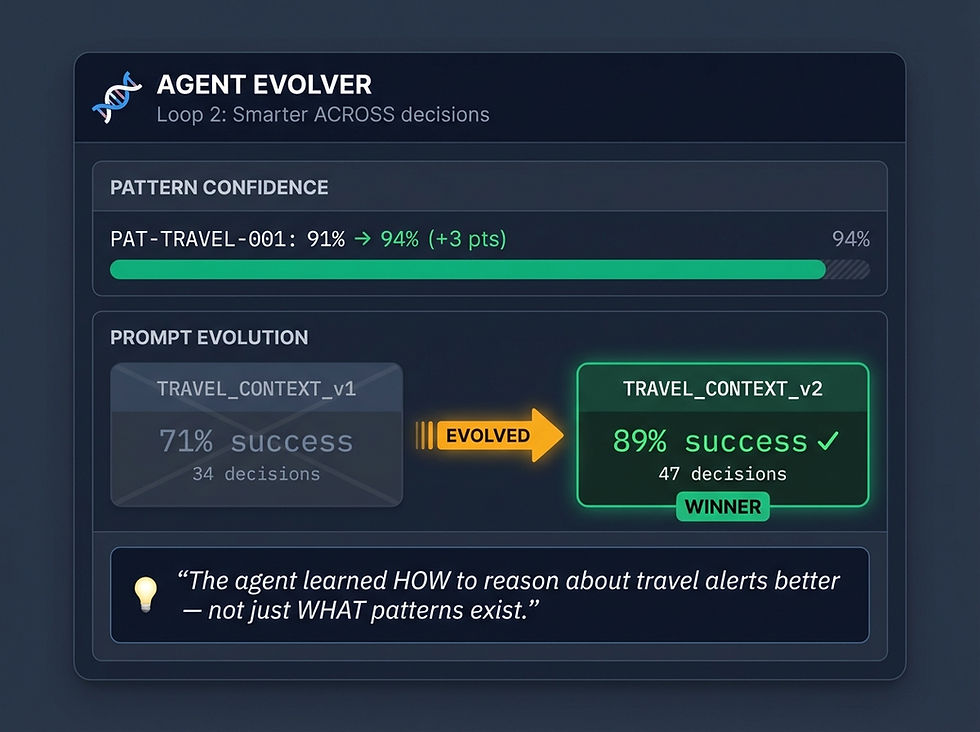
Type: NEW — NBP TO GENERATEArchetype: Diagram FlowTheme: DarkSize: 1024x768 (panel size)Content:
Header: "🧬 AGENT EVOLVER (Loop 2: Smarter ACROSS decisions)"
Pattern Confidence section:
PAT-TRAVEL-001 confidence: 91% → 94% (+3 pts)
Prompt Evolution section:
Left: TRAVEL_CONTEXT_v1 (71% success, 34 decisions) — dimmed
Right: TRAVEL_CONTEXT_v2 (89% success, 47 decisions) ✓ WINNER — highlighted
Arrow showing "EVOLVED"
Footer insight: "The agent learned HOW to reason about travel alerts better — not just WHAT patterns exist."
Use: Tab 2 — Shows agent behavior evolution, not just pattern learning
NBP Files: agent_evolver_panel_prompt.md + agent_evolver_panel.json
Demo Flow:
Show deployment registry (v3.1 active, v3.2 canary)
Click "Process Next Alert"
Watch eval gate panel — four checks, all pass
Scroll to decision trace
Key moment: TRIGGERED_EVOLUTION panel shows confidence update (91% → 94%)
Key moment: AgentEvolver panel shows prompt evolution (v1 → v2)
The Key Line: "Splunk gets better detection rules. Our copilot gets smarter."
Tab 3: Alert Triage (30% Energy)
Purpose: Show the CONSUME (graph traversal) and ACTIVATE (closed loop) systems in action.
[GRAPHIC-12] Alert Triage Tab UI Mockup — Hub & Spoke

Type: NEW — NBP TO GENERATEArchetype: Hub & SpokeTheme: LightSize: 2048x1152Content:
Tab bar with "Alert Triage" active
Hub (center): Alert ALERT-7823 being analyzed
Type: Anomalous Login
Severity: Medium (amber)
Status: Analyzing...
Spokes (radial, 6 connections):
User: John Smith (VP Finance, risk_score: 0.85)
Travel: Singapore trip (DL-847, Marriott Marina Bay)
Asset: LAPTOP-JSMITH (MacBook Pro, criticality: high)
VPN: Marriott Hotel VPN (known provider ✓)
Pattern: PAT-TRAVEL-001 (127 occurrences, 92% confidence)
Device: Fingerprint matches baseline ✓
Label: "47 nodes consulted across 5 subgraphs"
Recommendation panel: Action: FALSE_POSITIVE_CLOSE, Confidence: 92%
Bottom section: Closed Loop steps
EXECUTED → VERIFIED → EVIDENCE CAPTURED → KPI IMPACT
Label: "ACTIVATE — governed action with evidence capture"
NBP Files: alert_triage_tab_prompt.md + alert_triage_tab.json
[GRAPHIC-13] Situation Analyzer Panel

Type: NEW — NBP TO GENERATEArchetype: Diagram FlowTheme: LightSize: 1024x768 (panel size)Content:
Header: "🔍 SITUATION ANALYZER (Loop 1: Smarter WITHIN each decision)"
Classification section:
Classified As: TRAVEL_LOGIN_ANOMALY
Confidence: 94%
Contributing Factors (6 chips):
User: VP Finance
Travel: Singapore
VPN: Known Provider ✓
Device: Matches ✓
Pattern: 127 prior
Time: Business hrs ✓
Label: "6 factors from 47 nodes consulted"
Options Evaluated (horizontal bar chart):
FALSE_POSITIVE_CLOSE: 92% (full bar, green)
ESCALATE_TIER2: 6% (short bar, yellow)
BLOCK_AND_ALERT: 2% (minimal bar, red)
Selected indicator: "✓ Selected: FALSE_POSITIVE_CLOSE (highest confidence)"
Footer insight: "This isn't a script. The agent reasoned over context to reach this conclusion."
Use: Tab 3 — Shows situation classification before recommendation
NBP Files: situation_analyzer_panel_prompt.md + situation_analyzer_panel.json
Demo Flow:
Show alert queue (12 pending alerts)
Click on ALERT-7823
Watch security graph animate — nodes light up as context is gathered
"47 nodes consulted across 5 subgraphs"
Show Situation Analyzer panel — classification + factors + options
Show recommendation with confidence (92% — false positive)
Click "Auto-Close" → Closed loop steps appear
The Key Line: "A SIEM stops at detect. We close the loop."
Tab 4: Compounding Dashboard (15% Energy)
Purpose: Prove the moat is growing. Week 1 vs Week 4 comparison.
[GRAPHIC-14] Two-Loop Diagram

Type: NEW — NBP TO GENERATEArchetype: StackTheme: LightSize: 2048x1152Title: "TWO LOOPS, ONE GRAPH"Subtitle: "Both loops compound on the same knowledge substrate"Content:
Top section: LOOP 1 — "Smarter WITHIN Each Decision"
Steps: CLASSIFY → FACTORS → OPTIONS → DECIDE
Arrow down into Context Graph
Middle section (emphasized): "ACCUMULATED CONTEXT GRAPH (Neo4j / UCL)"
Chips: Users, Assets, Patterns, Decisions, Policies, Prompts, Confidence Scores
Labels: "CONSUME (Read)" and "MUTATE (Write)"
Bottom section: LOOP 2 — "Smarter ACROSS Decisions"
Steps: OUTCOME → PROMOTE → COMPARE → TRACK (reverse flow)
Arrow up into Context Graph
Connecting arrows showing both loops read from AND write to graph
Footer insight: "Two loops, one graph. That's compounding intelligence."
Use: Tab 4 — Hero visual showing two compounding loops
NBP Files: two_loop_diagram_prompt.md + two_loop_diagram.json
Key Visuals:
Week 1: 23 patterns, 68% auto-close, 12.4 min MTTR
Week 4: 127 patterns, 89% auto-close, 3.1 min MTTR
Evolution Events log (recent TRIGGERED_EVOLUTION events)
Two-Loop Diagram: Loop 1 (Situation Analyzer) + Loop 2 (AgentEvolver) = Compounding
Compounding Metrics:
Metric | Week 1 | Week 4 | Source |
Patterns learned | 23 | 127 | Loop 2 (AgentEvolver) |
Situation types handled | 2 | 6 | Loop 1 (Situation Analyzer) |
Prompt variants evolved | 0 | 4 | Loop 2 (AgentEvolver) |
Auto-close rate | 68% | 89% | Combined effect |
MTTR | 12.4 min | 3.1 min | Combined effect |
The Key Line: "When a new CISO tries a competitor, they start at zero situation types and zero evolved prompts. We start at 127 patterns, 6 situation types, and 4 evolved prompts. That's the moat."
Part 6: API Specification

yaml
Part 7: Competitive Positioning
The Architectural Differentiator

Type: NEW — NBP FROM SCRATCHReference: UCL Blog, Infographic 2 (for inspiration only)NBP Archetype: Before/AfterNBP Theme: Light (warm_cool palette)NBP Size: 2048x1152Title: "SOC Transformation: Before & After"Subtitle: "From alert fatigue to compounding intelligence"Content:
Left panel "Traditional SOC" (warm/red tones):
❌ Alert fatigue — 10,000+ alerts/day overwhelm analysts
❌ No learning — Same alert investigated 50+ times
❌ Slow response — 12+ minute MTTR
❌ Wasted effort — 80% false positive rate
❌ High cost — $24M annual analyst cost
Bottom: "Insights stop at dashboards"
Right panel "SOC Copilot" (cool/green tones):
✅ Pattern learning — 127 patterns, 89% auto-close
✅ Context-aware — Graph traverses 47 nodes per decision
✅ Fast response — 3.1 min MTTR (75% faster)
✅ Evidence-backed — Auto-close with full audit trail
✅ Cost efficient — $2.6M cost, $21.4M savings
Bottom: "Compounding intelligence"
Footer: "Works with: Splunk • Microsoft Sentinel • CrowdStrike • Palo Alto"
NBP Files: soc_before_after_prompt.md + soc_before_after.json
When competitors say "we have a knowledge graph too":
Competitor Claim | The Right Question | Why It Matters |
"We store data in Neo4j" | Do you have systems that CONSUME it for reasoning? | Without consumption, it's just a database |
"We capture decisions" | Do you have systems that MUTATE based on outcomes? | Without mutation, there's no learning |
"We integrate with SIEM" | Do you have systems that ACTIVATE governed actions? | Without activation, insights stop at dashboards |
vs. Traditional SIEMs (Splunk, Microsoft Sentinel)
Capability | Traditional SIEM | SOC Copilot |
Alert detection | ✓ | ✓ |
Log aggregation | ✓ | ✓ |
Dashboard/reporting | ✓ | ✓ |
Auto-triage with context | ✗ | ✓ |
Learning from decisions | ✗ | ✓ |
Compounding intelligence | ✗ | ✓ |
Pitch: "Splunk tells you what happened. We tell you what to do — and learn from every decision."
vs. SOAR Platforms (Palo Alto XSOAR, Swimlane)
Capability | SOAR | SOC Copilot |
Playbook automation | ✓ | ✓ |
Integration orchestration | ✓ | ✓ |
Self-tuning playbooks | ✗ | ✓ |
Pattern-based learning | ✗ | ✓ |
Situation analysis | ✗ | ✓ |
Pitch: "SOAR automates what you tell it. We automate and learn what you'd tell it next time."
vs. AI Security Vendors (Darktrace, Vectra)
Capability | AI Security | SOC Copilot |
Anomaly detection | ✓ | ✓ |
ML-based alerting | ✓ | ✓ |
Transparent reasoning | ✗ (black box) | ✓ (auditable) |
Decision trace capture | ✗ | ✓ |
Compounding across customers | ✗ | ✓ |
Pitch: "Darktrace detects anomalies. We detect, decide, and learn — with full audit trail."
[GRAPHIC-16] Competitive Posture

Type: EXISTING — Direct Reuse (Optional)Source: UCL Blog, Infographic 16 — "Competitive Posture — Where UCL Fits"Wix URL: https://static.wixstatic.com/media/1ea5cd_72008e82279e4d159d605779a03e9a6a~mv2.jpgContent: Shows competitive positioning matrixUse: Part 7 — Optional supporting graphic for competitive discussion
Show Image
Part 8: ROI Model
Cost Savings Calculation
Assumptions: 10,000 alerts/day, 80% FP rate, $120K fully-loaded analyst cost, 50 alerts/analyst/day
Before SOC Copilot:
Alerts requiring human review: 10,000/day
Analysts needed: 200 FTEs
Annual cost: $24M
After SOC Copilot (Week 4+):
Auto-closed: 8,900/day (89%)
Alerts requiring human review: 1,100/day
Analysts needed: 22 FTEs
Annual cost: $2.64M
Annual Savings: $21.36M
Qualitative Benefits
Benefit | Impact |
Reduced burnout | Lower turnover, better retention |
Faster MTTR | Reduced breach impact |
Audit compliance | Full decision trails |
Institutional knowledge | Patterns survive staff turnover |
Scalability | Handle growth without linear headcount |
Part 9: Implementation Roadmap
Phase | Duration | Goals |
Pilot | 4 weeks | Connect to SIEM, 1 alert type, baseline metrics, 50%+ auto-close |
Expansion | 8 weeks | Add phishing/malware/DLP, integrate SOAR, 75%+ auto-close |
Full Deployment | 12 weeks | All alert types, full closed-loop, 100+ patterns, 85%+ auto-close |
[GRAPHIC-17] Quick Wins Portfolio

Type: EXISTING — Direct ReuseSource: Gen-AI ROI in a Box Blog, Slide 15Wix URL: https://static.wixstatic.com/media/1ea5cd_05836ad13dfc47d3b205dc31f9bf26cd~mv2.jpegContent: "Quick Wins Portfolio — Where We Start in 30-60 Days"Use: Part 9 — Shows engagement pattern for partners
Show Image
Part 10: Demo Script (15 Minutes)
0:00 — The Hook (1 min)
"Week 1: 68% auto-close rate, 12-minute MTTR. Week 4: 89% auto-close, 3-minute MTTR. Same model. Same rules. The difference? Two loops feeding the same graph: a Situation Analyzer that reasons over context, and an Agent Evolver that improves behavior. That's compounding intelligence."
1:00 — Tab 1: SOC Analytics (2 min)
"Your security team spends hours building dashboards. Watch this." [Type: "What was our false positive rate last week by detection rule?"] "Instant answer with provenance. And we detected rule sprawl — 2,400 extra alerts/month."
3:00 — Tab 2: Runtime Evolution (5 min) ★
"This is where we show the architecture that makes compounding possible." [Click "Process Next Alert"] "See the eval gate? Four checks. This is CONSUME — reading the context graph." [Point to TRIGGERED_EVOLUTION] "This is MUTATE — the confidence just updated. 91% → 94%." [Point to AgentEvolver panel] "And look — the prompt evolved. v1 had 71% success. v2 has 89%. The agent learned HOW to reason better." "Splunk gets better detection rules. Our copilot gets smarter."
8:00 — Tab 3: Alert Triage (4 min)
"Watch the graph. 47 nodes traversed. This is CONSUME." [Point to Situation Analyzer panel] "Watch the Situation Analyzer. It classified this as TRAVEL_LOGIN_ANOMALY, evaluated three options, and chose FALSE_POSITIVE_CLOSE at 92%." "This isn't a script. The agent reasoned over context to understand the situation." [Click "Auto-Close"] "Now watch ACTIVATE — the closed loop. Evidence recorded for audit."
12:00 — Tab 4: Compounding (2 min)
"Here's the key insight. Two loops, one graph." [Point to Two-Loop Diagram] "Loop 1 — the Situation Analyzer — made each decision smarter. Loop 2 — the Agent Evolver — made the agent smarter over time." "Week 1: 2 situation types, 0 prompt evolutions. Week 4: 6 situation types, 4 prompt evolutions." "Competitors start at zero. We start at 127. That's the moat."
14:00 — Q&A
Appendix A: Sample Alerts for Demo
ALERT-7823 (Primary Demo Alert)

json
Expected Decision (with Situation Analysis)

json
ALERT-7824 (Phishing — Secondary Demo Alert)

Appendix B: Partner Talking Points
For Technical Audiences
"Context Graphs are necessary but not sufficient" — Having Neo4j doesn't make agents work. You need CONSUME, MUTATE, and ACTIVATE systems.
"Dual-input, dual-loop" — Structure flows in. Intelligence flows back. Both feed the same graph. That's compounding.
"Two loops, one graph" — Loop 1 (Situation Analyzer) makes each decision smarter. Loop 2 (AgentEvolver) makes the agent smarter over time.
"The demo proves the pattern" — This is a working implementation. The full UCL substrate scales it to enterprise.
For Business Audiences
"Week 1 to Week 4" — Same model, same rules. 68% → 89% auto-close. That's compounding intelligence.
"They start at zero" — Every competitor deployment begins from scratch. We start at 127 patterns, 6 situation types, 4 evolved prompts.
"The SOC that learns" — Splunk tells you what happened. We tell you what to do — and learn from every decision.
For CISO Audiences
"Audit trail by design" — Every decision captured. Evidence ledger. Full compliance.
"Analyst retention" — 87% reduction in overtime. People stop leaving.
"Institutional knowledge" — Patterns survive staff turnover. The SOC doesn't forget.
Key Soundbites (Memorize)
For Tab 2 — AgentEvolver:
"Look at the prompt evolution. v1 had 71% success. v2 has 89%. The system promoted v2. The agent learned HOW to reason better."
For Tab 3 — Situation Analyzer:
"Watch the Situation Analyzer. It classified this as TRAVEL_LOGIN_ANOMALY, evaluated three options, and chose FALSE_POSITIVE_CLOSE at 92%."
For Two Loops:
"Loop 1 made this decision smarter. Loop 2 made the agent smarter for next time. Both feed the same graph. That's compounding."
CISO Cybersecurity Ops Demo Specification v5 | February 2026Purpose: Demonstrate compounding intelligence in security operationsKey differentiator: Context Graphs operationalized through CONSUME + MUTATE + ACTIVATE


Comments